【javascript】クリックするとN秒後にダウンロードが開始されるダウンロードボタンの実装
目次
やりたいこと
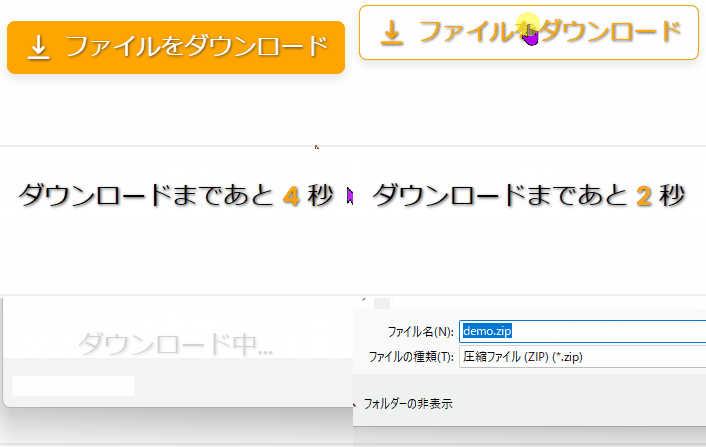
以下のように、javascriptを使って、クリックしてから 一定の時間が経ってから、 ダウンロードが始まるボタンの実装方法を紹介します。
コードは無料で提供するけど、少しでもページセッションを長くしたり、 インプレッション収益を上げたい時にこのボタンを使うことができます。
HTML
1行目 : data属性(data-timer="5") 設定した数字がカウントダウンされる。
2行目 : Google Fontsでアイコンを表示
<button class="download-btn" data-timer="5"> <!-- ここでは5秒でセット -->
  <span class="icon material-symbols-rounded">vertical_align_bottom</span>
  <span class="text">ファイルをダウンロード</span>
</button>
参考

【javascript】data属性とは?datasetで、取得、更新、追加する方法
Google Fonts Material Symbols アイコンをウェブで表示する方法
CSS
CSSは参考までに
.download-btn {
  display: flex;
  align-items: center;
  background: orange;
  padding: .5rem 1rem;
  box-shadow: 0 5px 10px rgba(0, 0, 0, 0.1);
  border: none;
  border-radius: 8px;
  color: #fff;
  text-shadow: 1px 1px 3px #333;
  cursor: pointer;
  transition: all 0.3s ease;
}
.download-btn:hover {
  transform: translateY(-15px);
  color: orange;
  background: #fff;
  border: 1px solid orange;
}
.download-btn .icon {
  font-size: 2rem;
}
.download-btn .text {
  font-size: 1.5rem;
  padding-left: 10px;
}
.download-btn.timer {
  color: #000;
  background: #fff;
  box-shadow: none;
  font-size: 1.6rem;
  pointer-events: none;
}
.download-btn.timer strong {
  color: orange;
  padding: 0 8px;
}
javascript
3行目 : ダウンロードするファイルのリンク
10行目 : data属性の数字をtimerに格納
14行目 : 1秒ごとカウントダウン
20行目 : timerが0になったらsetIntervalを停止
const downloadBtn = document.querySelector(".download-btn");

const fileLink = "https://gxy-life.com/images/PC DESK.jpg";  // ダウンロードするファイルのリンク

const countTimer = () => {
  if (downloadBtn.classList.contains("disable-timer")) {
    return (location.href = fileLink);
  }

  let timer = downloadBtn.dataset.timer;  //data属性の数字をtimerに格納
  downloadBtn.classList.add("timer");
  downloadBtn.innerHTML = `ダウンロードまであと <strong>${timer}</strong> 秒`;

  const initCounter = setInterval(() => {  // 1秒ごとカウントダウン
    if (timer > 0) {
      timer--;
      return (downloadBtn.innerHTML = `ダウンロードまであと <strong>${timer}</strong> 秒`);
    }

    clearInterval(initCounter); // timerが0になったらsetIntervalを停止
    location.href = fileLink;
    downloadBtn.textContent = "ダウンロード中...";

    setTimeout(() => {
      downloadBtn.classList.replace("timer", "disable-timer");
      downloadBtn.innerHTML = `<span class="icon material-symbols-rounded">vertical_align_bottom</span>
  <span class="text">もう一度ダウンロード</span>`;
    }, 3000);
  }, 1000);
};

downloadBtn.addEventListener("click", countTimer);
参考
【javascript】setIntervalと、それを停止させるclearIntervalの使い方
まとめ
- data属性にタイマーの数字をセット
- setIntervalでカウントダウン
- timerが0になったら、location.href = fileLink; でダウンロード開始


